Alert Bridge SMS Program & Opt-In Details
Alert Bridge is an enterprise notification platform used by organizations to deliver operational and facility-related alerts to employees and on-call staff via SMS. Alerts are generated by business systems such as building management systems, monitoring tools, and IT alerting systems.
Who Receives SMS Alerts
SMS alerts are only sent to individuals who have an existing business relationship with a subscribing organization. Typical recipients include:
- Employees responsible for facilities, operations, or IT services
- Contractors and vendors engaged by the organization
- On-call staff designated by the organization
How Recipients Are Added (Opt-In)
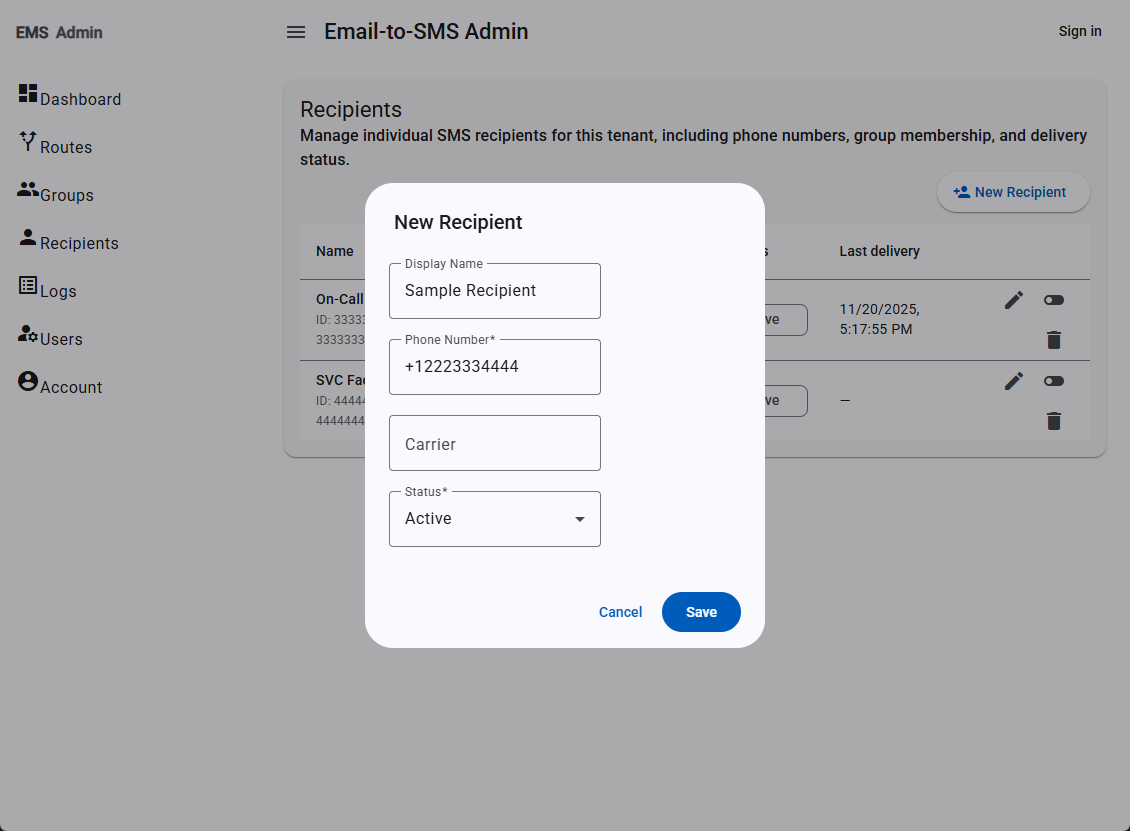
Recipients are added to Alert Bridge by authorized administrators within their organization. Phone numbers are collected through internal processes such as HR systems, IT directories, on-call rosters, or operations tooling. Administrators then enter these phone numbers into the Alert Bridge admin console to enable SMS alerts. This administrator-managed process serves as opt-in for SMS alerts.
In addition to this administrator-managed opt-in, recipients may manage their own participation in SMS alerts by replying STOP to opt out of receiving alerts and START to resume alerts after opting out.
Example: Administrator Adding an SMS Recipient
The image below shows a simplified example of how an authorized administrator adds a staff member as an SMS recipient in the Alert Bridge admin UI.
Opt-Out and Re-Enable (STOP / START)
Alert Bridge supports standard SMS opt-out and re-enable keywords. If a recipient no longer wishes to receive SMS alerts, they may reply STOP to any message sent from Alert Bridge. When STOP is received, SMS delivery to that phone number is disabled, and the recipient receives a confirmation message indicating that alerts have been stopped.
If the recipient later wishes to resume receiving alerts, they may reply START, which re-enables SMS notifications for their number. A confirmation message is sent after START is processed.
Recipients who reply STOP or START do not need to contact their administrator in order to change their SMS status, although administrators may also disable or re-enable recipients through the Alert Bridge admin console in response to internal requests.
Message Content
SMS messages sent by Alert Bridge are strictly operational in nature and may include:
- Alarms or alerts from building management systems
- Fault or status notifications for critical equipment
- Operational notifications that require on-call or facilities response
Alert Bridge does not send marketing or promotional SMS messages.